 ASHLEY TERRY
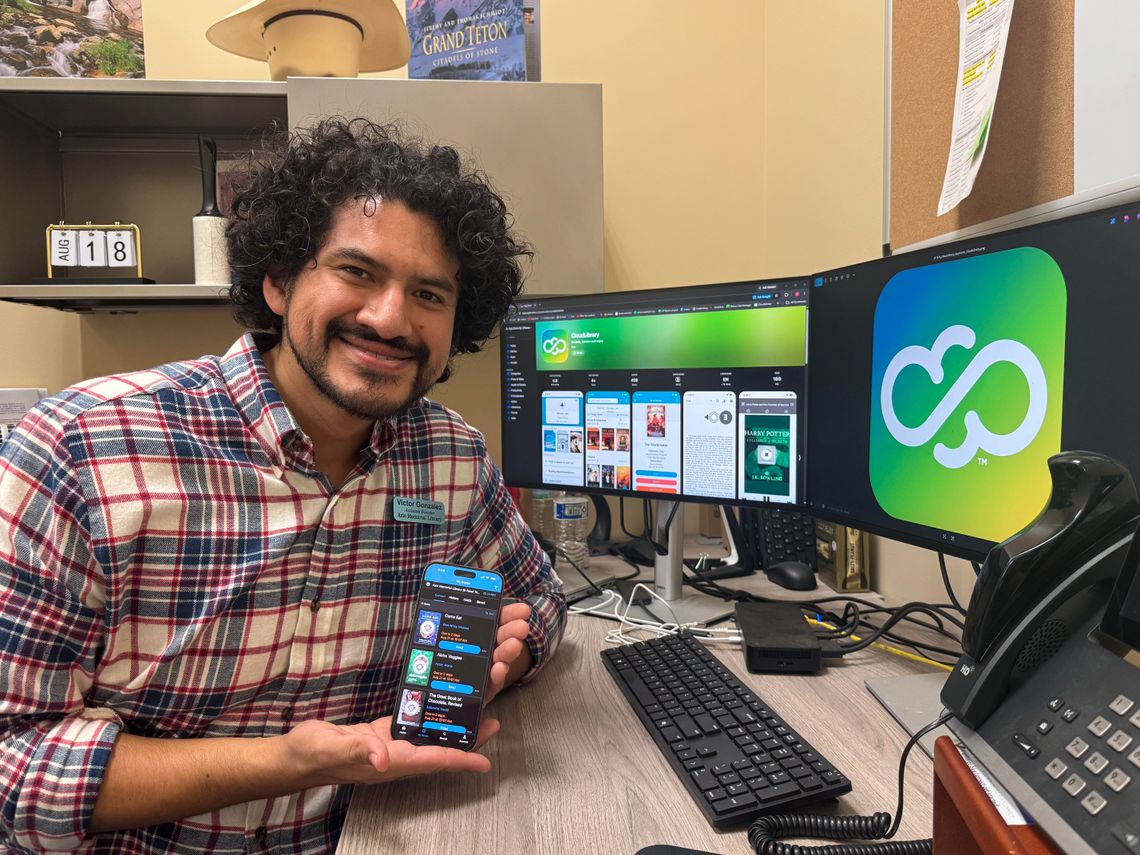
The sky’s the limit when it comes to your imagination — and now, thanks to the Azle Memorial Library, the same can be said for your to-be-read shelf.
As of Aug. 21, Azle readers have a new way to “check out” books online with the launch of CloudLibrary, a free digital reading app for Azle Memorial Library patrons.
Sponsored by the Texas State Library and Archives Commission, CloudLibrary gives book lovers a second option aside from Libby to check out e-books and audiobooks online. CloudLibrary is provided to AML at no cost through TSLAC after the library applied and met the program’s eligibility requirements.
“CloudLibrary is basically like the Libby app, but it's a different platform,” AML assistant director Victor Gonzalez told The Azle News. “It’s another app that patrons can use to check out books, get holds and things of that nature.”
Gonzalez said AML applied for CloudLibrary to expand the library’s digital bookshelf — which is especially helpful if a title isn’t available on Libby.
“We always want to provide more resources to the community,” he said. “Libby, it's a good platform, but it's also limited … so wanting to go to CloudLibrary definitely extends our digital library collection to the community.”
CloudLibrary allows up to 15 checkouts and five holds at a time — more than what Libby currently offers AML patrons — but Gonzalez said readers can use both platforms simultaneously, switching between the two to find available titles.
“A lot of the digital collections, it's based off what we own, so if we don't own it, unfortunately, you wouldn't have access to it,” Gonzalez said. “But you can hop from one platform to the next to see if the other one has it.”
By offering readers two digital library platforms to choose from, Gonzalez said he hopes to reduce the number of holds for popular titles — especially those with wait times so long readers may forget they even placed a hold in the first place.
“Some of those holds can be about 80 people long and you look at the waiting times, and it’s like five months,” Gonzalez said. “We have really tried to tackle that to try to lower the holds list.”
While Libby and CloudLibrary are similar, Gonzalez said CloudLibrary’s digital collection only contains the titles AML owns, while Libby’s selection is dependent upon titles purchased by the roughly 30 libraries that make up the North Texas Libraries on the Go consortium.
Before patrons can check out a digital title on Libby or CloudLibrary, AML first has to purchase a digital license, which can range anywhere from $50 to $100 depending on the title’s popularity.
“You would think it's one of those things where it's like, ‘Oh, you buy it and then you own it forever,’ but it's not; it's based off of the life or circulation of the title,” Gonzalez said. “The life of an item could be two years, or it could be dependent on the circulation, like 20 checkouts — whichever comes first. Once that expires, we have to buy the license again.”
Unlike digital licenses, physical books can remain in AML’s collection for years, and Gonzalez said the library primarily buys hardcover copies — not only so they will last longer, but also to provide quality materials for their patrons.
“We want to be a valuable resource for the community,” he said. “Some of the books that we have, we've had for years, and we try to extend the life of them as much as we can, as well.”
With a total of 67,650 physical copies and 37,536 digital titles — and counting — Gonzalez said the Azle Memorial Library staff will always do what it can to provide patrons with the best reading experience possible.
“We're always happy to serve our community and are happy to be a resource for them,” he said. “One of the things that makes us stand out in general is just the fact that we touch multiple lives in different periods of their time — from birth all the way to senior citizens — and I'm glad that we can provide resources for every age group.”
CloudLibrary is available to all AML cardholders. To get started, patrons can download the app from Google Play or the Apple App Store, select their language, country, state and library, then log in using their library card number and password — typically the last four digits of their phone number.
Please note that e-books from CloudLibrary are not currently compatible with standard e-ink Kindle devices like the Kindle Paperwhite or Kindle Oasis. CloudLibrary e-books can only be read on a smartphone, iPad, Kindle Fire, computer or other tablet device.